
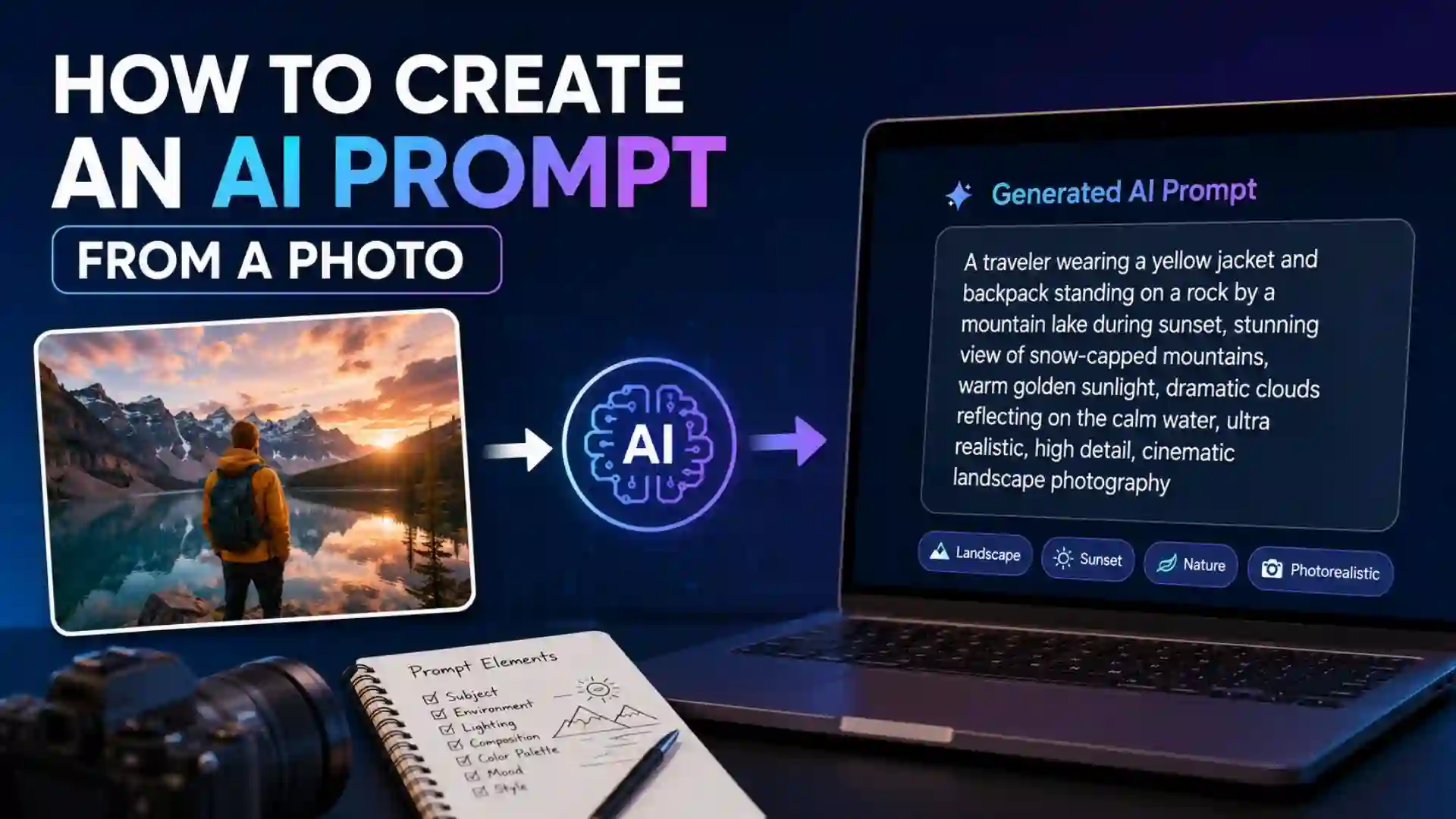
How to Create an AI Prompt from a Photo: Artificial Intelligence has transformed the way people create images, videos, designs, and written content. One of the most interesting developments in AI technology is the ability to generate detailed prompts from photographs. Instead of manually describing an image, users can upload a photo and use AI tools to analyze it, identify visual elements, and generate a detailed prompt that can be used for image generation, editing, content creation, and creative projects.
Learning how to create an AI prompt from a photo can significantly improve the quality of AI-generated outputs. Whether you are a digital artist, marketer, blogger, photographer, social media creator, or AI enthusiast, understanding this process can help you recreate similar images, modify existing visuals, or generate entirely new content inspired by a reference image.
This guide explains everything you need to know about creating AI prompts from photos, including methods, best practices, prompt structures, common mistakes, and practical examples.
What Is an AI Prompt?
An AI prompt is a text instruction that tells an artificial intelligence system what to create or generate. The quality and detail of a prompt directly affect the final output.
For example, instead of writing:
“Generate a mountain image.”
A detailed prompt might be:
“Majestic snow-covered mountains during sunrise, golden sunlight reflecting on icy peaks, dramatic clouds, ultra-realistic photography, cinematic lighting, high detail, 8K resolution.”
The second prompt provides much more context and produces better results.
What Does It Mean to Create an AI Prompt from a Photo?
Creating an AI prompt from a photo means analyzing an existing image and converting its visual elements into descriptive text.
The process involves identifying:
- Subject
- Background
- Colors
- Lighting
- Composition
- Camera angle
- Artistic style
- Mood
- Textures
- Visual effects
Once these elements are identified, they can be combined into a structured prompt that accurately describes the image.
Why Create AI Prompts from Photos?
There are many practical reasons to convert images into prompts.
Recreate Similar Images
A prompt allows you to generate images with a similar style, composition, or mood.
Improve Image Editing
AI editing tools often require detailed prompts to modify photos effectively.
Save Time
Instead of manually describing complex images, AI can help generate accurate descriptions quickly.
Learn Prompt Engineering
Analyzing existing photos teaches users how successful prompts are structured.
Content Creation
Bloggers, marketers, and designers can create variations of existing visual concepts for campaigns and projects.
Important Information and Resources
| Information | Description |
|---|---|
| Purpose | Convert visual content into text prompts |
| Main Use | AI image generation and editing |
| Required Input | Photograph or image |
| Output | Detailed text prompt |
| Useful For | Designers, artists, bloggers, marketers |
| Key Elements | Subject, style, lighting, colors, composition |
| Prompt Length | Usually 50–300 words |
| Best Practice | Describe image from foreground to background |
| Advanced Feature | Include camera and lighting details |
| Result | More accurate AI-generated images |
Understanding the Anatomy of a Photo
Before creating a prompt, it is important to understand what makes up an image.
Subject
The primary object or person in the image.
Examples:
- Woman walking on a beach
- Golden retriever dog
- Modern office building
- Mountain landscape
Environment
The location or setting where the subject appears.
Examples:
- Forest
- City street
- Desert
- Beach
- Studio
Lighting
Lighting dramatically influences image appearance.
Examples:
- Soft natural light
- Golden hour
- Sunset lighting
- Neon lighting
- Studio lighting
Colors
Color schemes contribute significantly to image mood.
Examples:
- Warm tones
- Cool tones
- Pastel colors
- Vibrant colors
- Monochrome
Composition
Composition refers to how elements are arranged.
Examples:
- Close-up shot
- Wide-angle shot
- Portrait composition
- Centered subject
- Rule of thirds
Style
Style determines artistic presentation.
Examples:
- Realistic photography
- Watercolor painting
- Anime style
- Oil painting
- Cyberpunk
Step-by-Step Process to Create an AI Prompt from a Photo
Step 1: Observe the Main Subject
Start by identifying the central focus of the image.
Ask:
- Who or what is in the photo?
- What is happening?
- What makes the subject unique?
Example:
“A young woman wearing a red dress.”
Step 2: Describe the Environment
Analyze the surroundings.
Example:
“Standing on a rocky cliff overlooking the ocean.”
Step 3: Identify Lighting Conditions
Determine how light affects the image.
Example:
“Warm golden sunset lighting.”
Step 4: Analyze Colors
Look for dominant color themes.
Example:
“Orange sky, blue ocean, warm natural tones.”
Step 5: Describe the Camera Perspective
Camera angles significantly impact the image.
Examples:
- Front view
- Side view
- Top-down view
- Aerial shot
- Low-angle shot
Step 6: Determine Artistic Style
Identify whether the image is:
- Realistic
- Digital art
- Cartoon
- Illustration
- Painting
Step 7: Add Quality Enhancers
Professional prompts often include rendering details.
Examples:
- Ultra realistic
- High detail
- Cinematic
- Professional photography
- 8K resolution
Step 8: Combine Everything
Merge all observations into a single prompt.
Example:
“Young woman in a flowing red dress standing on a rocky cliff above the ocean during sunset, warm golden lighting, dramatic sky, realistic photography, cinematic composition, ultra-detailed, professional DSLR photo, high resolution.”
Basic Prompt Formula
A simple formula can help beginners create effective prompts.
Subject + Environment + Lighting + Style + Quality
Example:
“Golden retriever running through a flower field, bright morning sunlight, realistic photography, vibrant colors, ultra-detailed.”
Advanced Prompt Formula
For professional results:
Subject + Action + Environment + Lighting + Camera Angle + Color Palette + Style + Technical Details
Example:
“Young traveler walking through a narrow European street, warm afternoon sunlight, eye-level camera angle, pastel color palette, realistic photography, shallow depth of field, professional DSLR image, highly detailed.”
Example 1: Portrait Photo
Imagine a portrait image containing:
- Female model
- Studio background
- Soft lighting
- Professional makeup
Prompt:
“Beautiful female model posing in a photography studio, soft diffused lighting, professional makeup, shallow depth of field, realistic portrait photography, ultra-high detail, cinematic quality.”
Example 2: Nature Landscape
Prompt:
“Spectacular mountain landscape covered with snow, golden sunrise illuminating the peaks, dramatic clouds, wide-angle photography, natural colors, ultra-realistic, breathtaking scenery, 8K quality.”
Example 3: Urban Street Scene
Prompt:
“Busy city street at night, colorful neon signs reflecting on wet pavement, pedestrians walking, cinematic atmosphere, cyberpunk aesthetic, highly detailed photography, vibrant lighting.”
Common Mistakes When Creating Prompts from Photos
Being Too Generic
Weak prompt:
“Person in a park.”
Better prompt:
“Young man jogging through a green park during sunrise, warm sunlight filtering through trees, realistic photography.”
Ignoring Lighting
Lighting affects mood and realism.
Always include:
- Morning light
- Evening light
- Studio light
- Neon light
Missing Style Information
Without style details, AI may generate inconsistent results.
Always specify:
- Realistic
- Digital art
- Watercolor
- Oil painting
- Anime
Overloading the Prompt
Adding too many unrelated details can confuse the AI.
Focus on the most important visual elements.
How AI Image Analysis Helps?
Modern AI systems can automatically identify:
- Objects
- Faces
- Colors
- Emotions
- Backgrounds
- Camera angles
- Artistic styles
These tools reduce the effort required to manually describe complex photographs.
Tips for Better Prompt Creation
Use Specific Adjectives
Instead of:
“Nice sky”
Use:
“Dramatic orange sunset sky with soft clouds”
Mention Mood
Examples:
- Peaceful
- Mysterious
- Energetic
- Romantic
- Futuristic
Include Camera Settings
Advanced prompts may contain:
- DSLR photography
- 85mm lens
- Shallow depth of field
- Bokeh effect
Add Resolution Details
Examples:
- High resolution
- Ultra detailed
- 4K
- 8K
Study Professional Prompts
Review successful prompts to understand structure and wording.
Prompt Template for Any Photo
You can use the following template:
“[Main Subject], [Action], [Environment], [Lighting Conditions], [Color Palette], [Camera Angle], [Artistic Style], [Quality Details], [Mood or Atmosphere].”
Example:
“Young woman reading a book, sitting in a cozy café, warm afternoon sunlight through windows, earthy color palette, eye-level perspective, realistic photography, ultra-detailed, peaceful atmosphere.”
Industries Using Photo-to-Prompt Techniques
Graphic Design
Designers recreate concepts quickly.
Marketing
Marketers generate promotional visuals based on reference images.
Blogging
Bloggers create feature images inspired by existing photographs.
E-Commerce
Businesses generate product imagery and variations.
Social Media
Creators produce consistent visual branding.
Photography
Photographers experiment with alternative styles and compositions.
Future of AI Prompt Generation
As artificial intelligence advances, photo-to-prompt systems will become more accurate and detailed. Future tools may automatically identify:
- Emotions
- Artistic influences
- Brand aesthetics
- Design trends
- Complex scene relationships
This will make content creation faster and more accessible for everyone.
FAQ about How to Create an AI Prompt from a Photo?
What is a photo-to-prompt AI process?
It is the process of converting an image into a detailed text description that can be used as an AI prompt.
Why are AI prompts important?
Prompts guide AI systems and significantly influence the quality of generated results.
Can I create prompts manually from photos?
Yes. By analyzing subjects, lighting, colors, composition, and style, you can manually create effective prompts.
What makes a good AI prompt?
A good prompt includes detailed information about the subject, environment, lighting, style, mood, and image quality.
How long should an AI image prompt be?
Most effective prompts range between 50 and 300 words depending on the complexity of the image.
Should I include camera details in prompts?
Yes. Camera-related descriptions such as lens type, depth of field, and photography style often improve realism.
Can AI generate prompts automatically?
Many AI tools can analyze images and generate descriptions automatically, though manual refinement often improves results.
Do detailed prompts produce better images?
In most cases, yes. Detailed prompts provide clearer instructions and lead to more accurate outputs.
Conclusion
Creating an AI prompt from a photo is an essential skill for anyone working with modern AI tools. By carefully analyzing the subject, environment, lighting, colors, composition, and artistic style of an image, you can transform visual information into highly effective prompts. Well-structured prompts improve image generation quality, make editing easier, and help users achieve more accurate and creative results.
Whether you are a designer, photographer, blogger, marketer, or AI enthusiast, mastering the art of converting photos into prompts can dramatically enhance your workflow. As AI technology continues to evolve, the ability to understand and describe images effectively will remain one of the most valuable skills in digital content creation.